HTML
Created: 2022-07-12
Tags: #fleeting
Tags
Attributes
Element
Basic Anatomy of an HTML Document
<!DOCTYPE HTML> Tells us what standard the webpage is using
<html> -> often called as root element
<head>
Everything you want to include in HTML...
- keywords / page description that appears in search result
- character set declarations <meta charset="utf-8">
- and more more Head in HTML
<title>
It's a text that appears on browser tabs
title tag is also what the bookmark title gets
</title>
</head>
<body>
contains all content that displays on the page,
including text, images, videos, games etc..
</body>
</html>
Some symbols can't be used in HTML - Special Characters or Entity References
The overall data structure of an HTML page is
like a tree, Trees in Programming
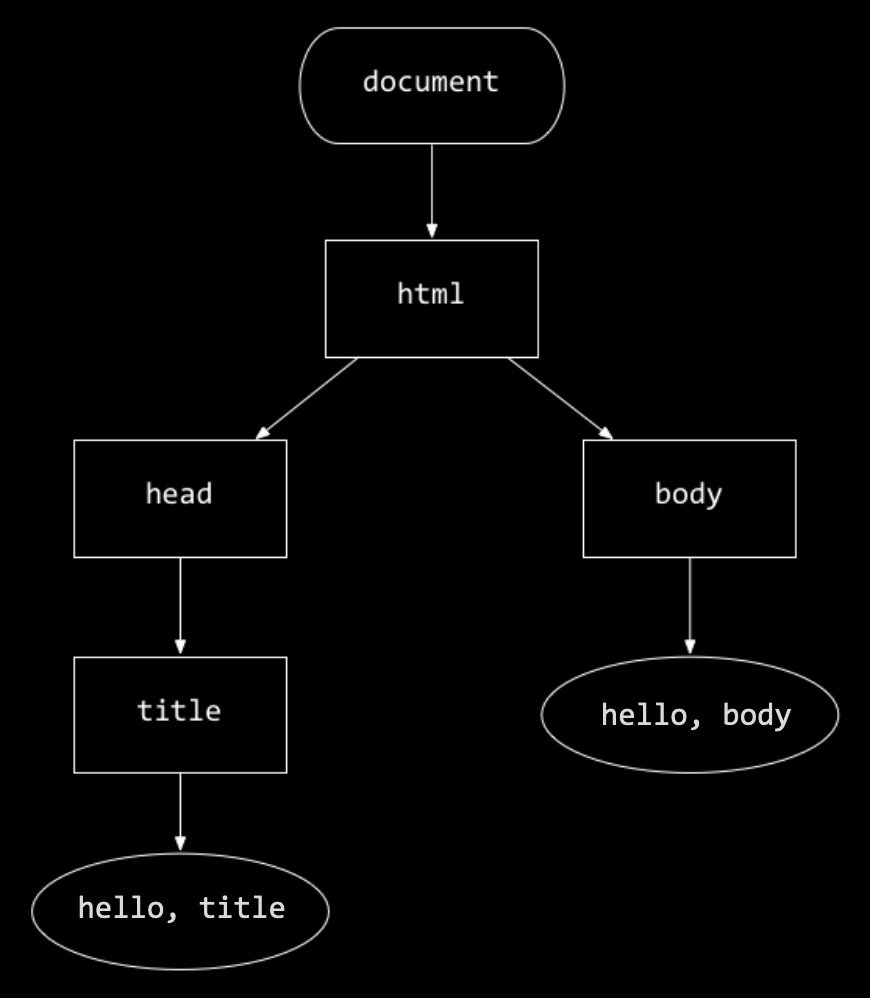
Rectangular nodes are tags,
Oval nodes are text.
URL
We can provide inputs in a request as part of a URL like
https://wwww.example.com/path?key=value.
Here, ? indicates that we’re adding inputs, which will include one or more key-value pairs.
Take user input and direct it to other website
<form action="https://www.google.com/search" method="get">
<input name="q" type="text">
<input type="submit">
</form>
<form> tag that has an action of Google search URL, with a method of GET.
Inside the form, we have two <input>,
- First <input> is name=q with type=text
- Second <input> type=submit is a button
When second input is clicked, the <form> will add the <input> <type=text> to URL
NOT working above
Advance Text Formatting
Always keep an accessibility mindset. The concept of italics isn't very helpful to people using screen readers, or to people using a writing system other than the Latin alphabet.
https://developer.mozilla.org/en-US/docs/Learn/HTML/Introduction_to_HTML/Advanced_text_formatting#abbreviations
Abbreviations
Making up Contact Details
Superscript and subscript
Representing Computer Code
Marking up time and dates
Address element - Provides Contact Details
Note: The <address> element should only be used to provide contact information for the document contained with the nearest <article> or <body> element.
It would be correct to use it in the footer of a site to include the contact information of the entire site, or inside an article for the contact details of the author, but not to mark up a list of addresses unrelated to the content of that page.
Short Example
<address>
Chris Mills, Manchester, The Grim North, UK
</address>
Long Ass Example
<address>
<p>
Chris Mills<br>
Manchester<br>
The Grim North<br>
UK
</p>
<ul>
<li>Tel: 01234 567 890</li>
<li>Email: me@grim-north.co.uk</li>
</ul>
</address>
Computer Codes
This are elements that marks up codes
<code>: Usually all codes are warped here.
<pre>: For retaining whitespace (generally code blocks) —
Browsers ignore more than 1 whitespaces therefore <pre> tag helps retain the whitespace
Specific Computer Codes
<var>: for variable names.
<kbd>: for user inputs.
<samp>: for output of a program.
Debugging
Use a markup validation service https://validator.w3.org/
HTML Parser is sort of like compiler in programming but a more forgiving one
To embed images
Inserting images in html - img tag
!! COPY PASTED !!
Because I did not understood how it would be helpful to me yet
Use figure, figcaption in:
- images
- audio
- video
Captions
<figure> tag
<figcaption> tag
What does it do?
<figcaption>describes the picture inside of<figure>element- The two elements provide a semantic container for figures
<figure>
<img
src="images/dinosaur.jpg"
alt="The head and torso of a dinosaur skeleton;
it has a large head with long sharp teeth"
width="400"
height="341" />
<figcaption>
A T-Rex on display in the Manchester University Museum.
</figcaption>
</figure>
Why bother with html images when you can just use a simple, neater version of CSS?
Ans: CSS are for decoration only, they can't provide semantic meaning therefore they are invisible to screen readers., Semantics are tags that provide meaning,
VIDEOS and AUDIO in HTML
Videos and Audio can be implemented with the following:
<video></video><audio></audio>- JavaScript API
Embedding other webpages - iframe element
Embed external resources such as pdf - `embed` and `object` element
Tabs in HTML
Regular space:
Two spaces gap:
Four spaces gap: Container Element in HTML
Tab Spaces in HTML